

How to Create, Print & Use Shipping Labels in the UK (Step-by-Step Guide)

Shipping in the UK gets easy when your shipping label is correct, scannable, and placed properly. This guide from trustlogix shows you how to create labels, attach them, and handle returns, using the same steps UK couriers and marketplaces expect.
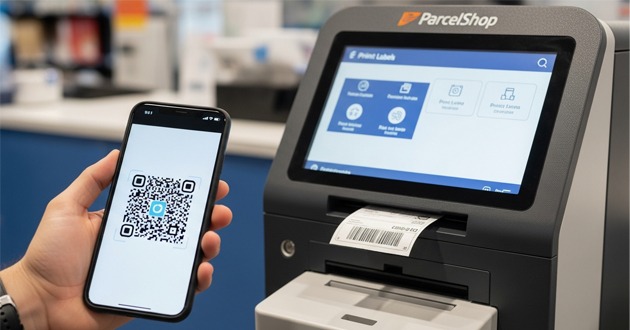
You’ll also learn how to print labels when you don’t have a printer at home, using QR code options like Evri “Print in Parcel Shop” and Royal Mail Click & Drop drop-off printing.
What is a shipping label?
A shipping label is the sticker (or printed page) that tells a courier where your parcel must go. It includes a barcode, allowing the network to scan and route it quickly. Many people use “shipping labels UK” and “parcel label” to mean the same thing.
Shipping label vs postage label in the UK (what people mean by each)
A print postage label usually means: “I paid for postage online and now I need the label.” A shipping label often means the same thing, but it may also include extra details like service level and tracking.
In short:
- print postage label = proof you paid + address + barcode
- shipping label = delivery label + barcode + tracking + courier details
Royal Mail Click & Drop is a common UK example where you “create labels” online, then print them yourself or at a drop-off point.
What goes on a shipping label (UK essentials: addresses, tracking, barcode, service)
A strong package label should include:
- Sender address/return address
- Recipient address (with postcode format UK)
- Tracking number + barcode / 2D barcode
- Service level (standard / next day)
- Parcel reference number (sometimes)
- Weight and dimensions (often in the booking flow)
- Delivery instructions (if supported)
If any of these are wrong, scans fail, parcels stall, and returns become painful.
Printing Address Labels & Postal Mailing Labels (Letters vs Parcels)
For printing address labels, keep the address block clean and left-aligned. Use a readable font and avoid fancy styling. A simple label template works best.
Quick UK format tips:
- Put the postcode on its own line at the bottom.
- Use correct spacing (example: “SW1A 1AA”).
- Avoid commas in the postcode line.
- Keep “recipient address” larger than everything else.
These rules apply whether you’re printing “address labels” for parcels or basic mailing labels for letters.
Postal mailing labels for letters/large letters (when a simple address label is enough)
If you’re sending a letter or a large letter, you may only need postal mailing labels (address only). But for parcels, you normally need a full postage label-style print with a barcode.
If you’re unsure, assume you need a proper shipping label for anything thicker than a large letter.
Return address rules (when and where to include it)
Add a return address when:
- You sell online (eBay/Etsy/Shopify)
- You ship internationally
- The item has value
- You want the parcel returned if delivery fails
Keep it small and separate from the main address block. Don’t let it compete with the recipient details.
Choose the Right Label Format (A4 vs 4×6) for UK Shipping
A4 print shipping label (cut-and-tape method)
Many UK senders print shipping labels on A4 paper. It works fine if you do it right:
- Download label PDF (a printable shipping label PDF).
- Print at “Actual size” (no scaling).
- Cut around the label area.
- Tape it flat using packaging tape.
This is the simplest way to print a shipping label at home.
4×6 / 100×150mm package label (best for speed + scanning)
If you send parcels weekly, 4×6 (label size 6×4 / 4×6) saves time. It prints faster, wastes less paper, and stays consistent for scanning. This is where a shipping label printer shines, especially a thermal label printer 4×6 (like a Zebra label printer).
Label materials that survive UK handling (smudge-proof, waterproof protection)
UK weather and warehouse handling are rough. Use:
- Adhesive labels / sticky label printing (strong glue)
- A clear pouch/document wallet for extra protection
- Waterproof label cover if parcels face rain
Avoid low-quality paper that smudges. A barcode that fades means delays.
Shipping Label Printer Guide
Thermal vs inkjet/laser for shipping labels (what to use at each volume)
A shipping label printer is usually a thermal printer. Thermal printers don’t use ink. They print fast and stay crisp.
Simple choice guide:
- 1–5 parcels/week: A4 printer shipping labels (inkjet vs laser for labels) is fine
- 5–50 parcels/week: thermal label printer (direct thermal) saves money
- 50+ parcels/week: thermal printers + batch printing is the standard
What to look for in a label printer for shipping labels (size support, drivers, speed)
When buying a label printer for shipping labels, check:
- Support for 4×6 / 100×150mm
- Print quality (barcode not fading)
- Windows/Mac drivers + easy setup
- Auto label detection
- Good roll holder (reduces jams)
If you want one phrase to remember: buy a label printer for shipping labels that prints 4×6 cleanly, every time.
Label roll + compatibility checklist (4×6, fanfold, direct thermal)
Before you order supplies (and hit a “minimum order” you don’t need), confirm:
- Direct thermal labels (no ribbon needed)
- Roll size fits your printer
- Fanfold labels supported (optional)
- Correct core size (many printers need 1” or 1.5”)
Create a Shipping Label Online in the UK
Option 1: Create labels via UK couriers (Royal Mail, Evri, etc.)
To create a label online, most couriers follow the same flow:
- Enter sender + recipient details
- Add weight and dimensions
- Choose service level (standard / next day)
- Pay and download the label PDF
Royal Mail Click & Drop is designed to help you create labels, connect marketplaces, and print labels yourself or at drop-off points.
Evri lets you book online and use a QR code to print at a Parcel Shop device if you have no printer.
Option 2: Create labels in marketplaces (eBay) and eCommerce tools (Shopify)
If you sell online, marketplace labels save time:
- eBay: You can select Print postage label, add weight/size, pay, then print.
- Shopify shipping labels UK / WooCommerce shipping labels UK: often support order import, bulk label printing, and batch printing labels
- Etsy shipping label UK: similar flow, buy, download, print
These tools are basically a shipping label generator UK inside your selling platform.
Option 3: Use multi-carrier shipping software (bulk labels, automation)
If you compare prices often, multi-carrier tools help you:
- generate shipping label
- download label PDF
- run order import/bulk label printing
- Keep a clean returns portal/returns label workflow
Common examples include Parcel2Go labels and Pack link shipping labels (use whichever matches your courier mix).
How Do You Print Labels?
Print shipping label from a PDF (correct settings: size, margins, scaling)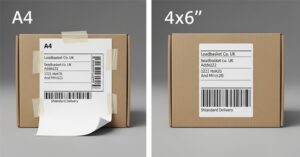
If you’re asking how to print labels from a PDF, do this:
- Open the printable shipping label PDF
- Select “Actual size” (not “Fit to page”)
- Confirm paper size (A4 or 4×6)
- Print a test on plain paper first (for alignment)
This avoids the #1 UK problem: barcodes printing too small.
Print postage label at home vs print in-store (when you don’t have a printer)
No printer shipping label (UK)? You still have options.
- Evri “Print in Parcel Shop”: book online, receive a QR code, scan to print a label at the device, then attach it.
- Royal Mail Click & Drop: Royal Mail notes you can print labels for free at lockers/parcel shops (Collect+ or Post Office) or delivery offices.
That’s the practical answer to “label printing near me (UK)”: use the courier’s drop-off network and find your nearest location.
Common printing problems (blurry barcode, wrong size, cut-off edges)
Fix these fast:
- Blurry print: use “normal” or “high” quality mode
- Wrong size: disable “scale to fit.”
- Cut-off edges: increase margins or switch to the correct label template
- Smudging: switch paper or use adhesive labels made for your printer
How to Attach and Protect a Shipping Label (Scanning Success)
Where to place the label on a parcel (flat, largest face, no folds)
Place the label on the flattest, largest face. Keep it away from seams, edges, and corners. A folded barcode may not scan.
Also:
- Remove old labels
- Don’t place it over the box joins
- Keep the barcode / 2D barcode flat
Tape rules: protect the label without blocking barcodes
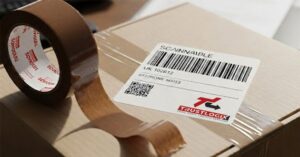
Use packaging tape to secure the label edges. If you cover the barcode area, avoid glare and wrinkles. A clear pouch/document wallet is the safest approach for wet weather.
Final pre-drop checklist (address clarity, barcode scan, old labels removed)
Before you drop off the parcel:
- Recipient address is correct
- Postcode format UK is correct
- barcode looks sharp
- old labels removed
- parcel sealed (original packaging is fine if strong)
Returns Label in the UK
Print a returns label at home (email/PDF workflow)
Most brands send a link to their returns portal. You select the reason, confirm details, and then print your return label as a PDF.
Best practice:
- Use the original packaging if it’s intact
- Add padding if the item can move
- Keep proof of posting
Printer-less returns: QR code label printing in-store (Royal Mail / Post Office / Evri)
Printer-less returns keep growing in the UK.
Evri returns: you can return your parcel via Parcel Shop and print the Evri returns label at the device using a QR/authorization code.
Evri also explains the “Print in Parcel Shop” QR flow for sending or returns.
This solves “how to print shipping label without printer UK” in real life: scan the QR code to print the label, then hand it in.
What to include inside the parcel (returns note, order info, proof of posting)
To return your item safely:
- Put a short note with your name + order number
- Include the returns reference (if given)
- Keep the receipt (proof of posting)
- Make sure the label matches the parcel (don’t mix labels)
International Shipping Labels from the UK
When you need CN22 vs CN23 (and why “digital customs” matters now)
Post Office guidance says CN22 is used for gifts/goods abroad under £270 with Royal Mail, and customs forms are mandatory for gifts/goods sent outside the UK from Great Britain.
What to put on customs details (item description, value, HS code basics)
Customs needs clarity:
- Item description (simple, specific)
- Value (truthful)
- Net weight
- HS code/commodity code (often required for businesses)
- VAT/duties/customs charges may apply at the destination
Post Office notes businesses may need HS tariff codes and VAT/EORI fields on customs forms.
Avoid delays after Brexit (EORI/invoice notes for business shippers)
If you ship as a business, keep your EORI number ready. Add a commercial invoice when couriers require it. Poor customs details cause holds, returns, or extra charges.
Quick “Print a Label” Checklist
Create → Print → Attach → Drop off (30-second checklist)
- Create a label online (courier, marketplace, or shipping software)
- Confirm weight and dimensions
- Download label PDF
- Print labels online at home (A4/4×6) or use QR code print service
- Attach flat, protect from rain
- Drop off parcel or book collection
- Track the parcel online using the tracking number
Label printer setup checklist (for repeat shipping)
- Choose a thermal label printer (4×6)
- Use the correct label roll type (direct thermal)
- Test print one label
- Save your shipping label template UK settings
- Keep spare rolls so you don’t panic mid-dispatch
Frequently asked questions
Can I print a shipping label at the Post Office in the UK?
Yes. Many services let you print at a drop-off point. For example, Royal Mail highlights printing at lockers/parcel shops and Post Office locations for label printing.
How do I print shipping labels UK if I only have my phone?
Use a QR code option. Evri lets you book online, receive a QR code, then scan to print a label at a Parcel Shop device.
What size should a UK parcel label be?
Most couriers accept A4 paper labels, but 4×6 (100×150mm) is the standard for fast scanning and thermal label printers.
Do I need a special shipping label printer?
No, but it helps. If you ship regularly, a shipping label printer (thermal) is quicker and cheaper than ink. If you ship rarely, A4 printing works fine.
Can I tape over the label?
You can protect it, but don’t create glare, wrinkles, or folds. Keep the barcode flat and readable. A clear pouch is often safer than fully taping over the barcode area.
What is a prepaid return shipping label?
It’s a label where postage is already paid by the retailer. You usually get it through a return portal, then print at home or use a QR code print option where available.
Do I need CN22/CN23 for international shipping from the UK?
Often, yes, especially for goods. CN22 commonly applies under £270 with Royal Mail, and customs forms are required for gifts and goods sent outside the UK from Great Britain.
